
GTranslate Visual Addon: correct GTranslate translations in WordPress without a monthly subscription
· Sasha
Translating a WordPress website with GTranslate can be one of the fastest ways to create a multilingual site. In minutes you can offer several languages, add a language selector and let visitors read in their own language.
But there is a common problem: automatic translation doesn't always get it right.
Sometimes GTranslate translates a phrase literally. A WooCommerce button may look odd, Elementor text may sound unnatural, or a call to action may lose its commercial intent. A poor translation can even change the meaning of an important sentence.
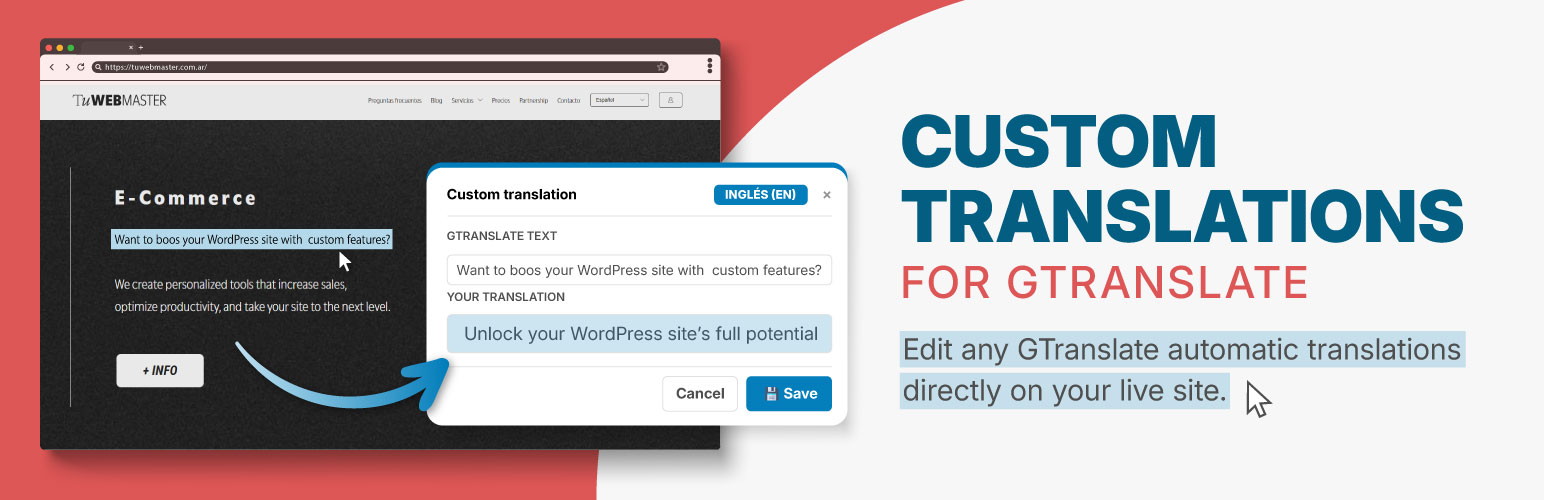
To solve this problem we created GTranslate Visual Addon, a WordPress plugin that lets you visually correct GTranslate translations from the frontend, without coding, changing templates or rebuilding the whole website with another multilingual system.
The idea is simple: GTranslate performs the automatic translation; GTranslate Visual Addon lets you manually correct the text that matters.
What problem does GTranslate Visual Addon solve?
Many people choose GTranslate to translate WordPress simply and quickly, without complicated settings. For a landing page, business website, small store or service website, it can be a practical solution.
The problem appears when you need more control.
For example:
- A purchase button sounds unnatural in translation.
- Sales copy loses its impact.
- A WooCommerce checkout sentence is misunderstood.
- A form shows a literal translation.
- An Elementor heading looks odd in another language.
- A call to action no longer sounds professional.
- An important keyword isn't translated as you want.
You don't always need to change the whole translation system. Often, you only need to correct a few specific phrases.
That is exactly what GTranslate Visual Addon does: it replaces an automatic GTranslate translation with a clearer, more natural manual version aligned with your business.
How the visual translation editor works
It is designed for any WordPress administrator to use without technical knowledge.
The workflow is:
- Install GTranslate on your WordPress website.
- Install GTranslate Visual Addon.
- Visit the frontend while logged in as an administrator.
- Switch to the language you want to correct.
- Enable visual translation mode.
- Select the text you want to correct.
- Enter the correct translation.
- Save the change.
When visitors view the website in that language, your manually corrected text will override the automatic translation.
You don't need to edit PHP files or create .po or .mofiles. You don't need to duplicate pages, edit theme code or rely on a developer to correct a button or visible phrase.
Corrections are made visually on the actual website.
GTranslate handles automatic translation; the addon corrects what matters
GTranslate Visual Addon does not replace GTranslate.
GTranslate remains the engine that translates the website and switches languages. The addon provides manual control to correct, adjust or override specific text.
It is useful for people who already use GTranslate and like its speed and simplicity, but need to improve specific parts of the final result.
Automatic translation can handle much of the content. A professional website also needs clear text that builds trust and preserves the original intent.
A poorly translated button can affect a sale. An unusual form sentence can undermine trust. A bad checkout translation can make users hesitate. Manually correcting important visible text can make a real difference.
What the Lite version is for
The Lite version of GTranslate Visual Addon is available in the official WordPress repository and is designed for occasional corrections.
It is ideal if you need to:
- Try the visual correction workflow.
- Fix a few poorly translated phrases.
- Correct important buttons.
- Adjust visible landing-page text.
- Improve forms or calls to action.
- Correct small parts of WooCommerce or Elementor.
- Fix specific errors without a monthly subscription.
The free version lets you correct up to 10 visual text elements in 1 language. For many small websites, that is enough to fix their most important buttons, headings, labels, contact messages or sales phrases.
It is also a simple way to check whether this workflow suits your website.
Lite is a complete solution with limited scope: it lets you correct specific GTranslate translations directly from WordPress, without monthly payments or coding.
Try the free version on WordPress.org
GTranslate Visual Addon is available in the official WordPress plugin directory. Install it from your WordPress dashboard to correct up to 10 texts in one language. It requires GTranslate to be installed and active.
When to upgrade to GTranslate Visual Addon Pro
Pro is designed for websites where translation is more than an occasional correction.
GTranslate Visual Addon Pro is suitable if you have:
- A website with multiple pages.
- A WooCommerce store.
- An Elementor website.
- Several important calls to action.
- Many products or categories.
- Sales copy that needs to sound natural.
- More than one language to correct.
- A need to work on translations in bulk.
- An interest in controlling titles and meta descriptions per language.
Pro unlocks unlimited visual corrections, supports all languages, adds CSV import/export and gives you control of SEO titles and meta descriptions.
You can move from correcting individual phrases to a more complete system for managing translation quality on a live WordPress website.
Free vs Pro: what each version includes
| Feature | Lite version | Pro version |
|---|---|---|
| Visual correction from the frontend | Yes | Yes |
| Manual corrections | Up to 10 | Unlimited |
| Available languages | 1 language | All languages |
| Use with GTranslate | Yes | Yes |
| Use with Elementor | Occasional corrections | Advanced use |
| Use with WooCommerce | Occasional corrections | Advanced use |
| CSV import/export | No | Yes |
| SEO title translation | No | Yes |
| Meta description translation | No | Yes |
| Access type | Free | One-time payment |
Lite is a complete solution with limited scope. Pro is a separate plugin that extends its capabilities for larger projects, agencies, online stores and multilingual websites in production.
Why it is useful for WooCommerce
WooCommerce is one area where the difference between acceptable automatic translation and carefully written translation is most noticeable.
In an online store, text is part of the buying process, not just information.
Some examples:
- “Add to cart”.
- “Checkout”.
- “Apply coupon”.
- “Shipping method”.
- “Billing details”.
- “Place order”.
- “Product successfully added”.
- “View cart”.
If these phrases sound odd or too literal, shoppers may feel the store has not been properly maintained. When someone is about to pay, details that affect trust matter.
GTranslate Visual Addon lets you visually correct visible text so checkout, cart and purchase buttons look more professional in every language.
Lite may be enough for a store with a few critical phrases. For stores with many products, categories, filters, buttons and messages, Pro offers unlimited corrections and more operational control.
Why it is useful for Elementor
Elementor makes visual website building easier, but automatic translation can misinterpret particular blocks, buttons or sales copy.
With GTranslate Visual Addon you can correct visible Elementor text, including:
- Main headings.
- Subheadings.
- Buttons.
- Text widgets.
- Forms.
- Calls to action.
- Sales sections.
- Trust messages.
- Service blocks.
This is particularly useful for landing pages, sales pages, business websites and pages designed to generate inquiries.
Instead of rebuilding the page in another language, you can automatically translate it with GTranslate and visually correct phrases that need a more natural version.
Translate WordPress without monthly payments
A common WordPress question is how to translate a website without paying for a multilingual system every month.
Many translation plugins use recurring plans, word limits, per-language fees or annual subscriptions. That may suit some projects, but it can be hard to justify for small websites, new stores or service websites.
GTranslate Visual Addon meets a different need: helping existing GTranslate users improve specific translations without adopting a heavy solution.
Lite is free on WordPress.org. Pro is purchased once from Tu WebMaster and is designed for people who need more control, more languages and unlimited corrections.
It is a simple alternative for one specific task: visually correcting GTranslate translations in WordPress.
CSV import and export in Pro
Correcting text one element at a time can be slow on websites with many pages or products. Pro therefore includes CSV import and export.
This workflow makes translations easier to organize:
- Export text from the website.
- Work on it in Excel, Google Sheets or a spreadsheet.
- Correct translations in batches.
- Import them back into the website.
This is particularly useful for agencies, online stores, catalogs, websites with many landing pages and projects where someone reviews translations outside WordPress.
Pro combines visual editing with bulk spreadsheet management.
SEO control for each language
Translating visible content matters, and so does how each page appears on Google.
Pro lets you manually translate SEO elements such as:
- SEO title.
- Meta description.
- Open Graph title.
- Open Graph description.
This gives each language a clearer presentation in search results and social media.
A page may have a great Spanish title but an unnatural automatic translation in English or French. Pro lets you correct that title and meta description for a more professional result.
This does not replace a complete multilingual SEO strategy, but it adds useful control for websites improving the presentation of translated pages.
Is it an alternative to other translation plugins?
It depends on your needs.
If you need complete page versions, complex editorial translation management, independent language URLs or advanced translation workflows, another multilingual solution may be more suitable.
If you already use GTranslate and mainly need to fix some poor automatic translations, GTranslate Visual Addon can be a simpler solution.
It is particularly relevant to searches such as:
- Plugin to correct GTranslate translations.
- How to edit GTranslate translations in WordPress.
- Translate WordPress with GTranslate and correct text.
- WordPress translation plugin without monthly payments.
- Correct automatic translations in WooCommerce.
- Translate Elementor with GTranslate.
- Visual translation editor for WordPress.
- Simple translation alternative for WordPress.
The goal is to keep a fast workflow and add manual control where automatic translation falls short.
Which version to choose
Choose Lite if:
- You want to try the system.
- You only need to correct a few phrases.
- You have a landing page or small website.
- You use one additional language.
- You want a free solution for occasional adjustments.
Choose Pro if:
- You need unlimited corrections.
- You work with several languages.
- You have WooCommerce.
- You use Elementor on multiple pages.
- You want CSV import/export for translations.
- You want to control titles and meta descriptions per language.
- You have a live website where translation affects trust or sales.
Frequently asked questions
Do I need GTranslate installed?
Yes. GTranslate Visual Addon is an addon for GTranslate. GTranslate handles the language selector and automatic translation. The addon lets you manually correct visible text translated poorly, literally or incompletely.
Does Lite translate the whole website?
No. Lite lets you correct specific translations. It is intended for small websites or testing the workflow with up to 10 visual corrections in 1 language.
Does Pro translate automatically?
No. Automatic translation still depends on GTranslate. Pro provides unlimited manual corrections and management, plus CSV and SEO title/meta features.
Does it support WooCommerce?
Yes. It can correct buttons, cart and checkout text, labels, filters, messages and other visible frontend text.
Does it support Elementor?
Yes. It corrects visible text generated by Elementor, such as headings, text widgets, buttons, forms and calls to action.
Do I need a monthly subscription?
Lite is free. Pro is available from Tu WebMaster for a one-time payment, with a Pro license to unlock advanced features.
Can I use it for several languages?
Lite is limited to 1 language. Pro supports all available languages.
Download GTranslate Visual Addon Lite or buy Pro
To try the solution, install GTranslate Visual Addon Lite from the official WordPress repository.
If you already use GTranslate on a live website and need unlimited corrections, all languages, CSV and SEO control, you can purchase GTranslate Visual Addon Pro from Tu WebMaster.
GTranslate helps you translate quickly. GTranslate Visual Addon helps those translations look good, sound natural and build trust.
Download Lite View ProI'm Sasha Herscovich, and I design, develop and provide technical support for online stores built with WordPress and Odoo. I solve real problems every day and occasionally share what I encounter in case it helps someone else.
This blog contains ideas, solutions and code snippets I use in real projects. Some are for people who manage their own websites; others are for developers and designers looking to improve their work, save time or understand how to solve a particular issue.
I don't sell magic formulas or universal solutions. I share what works for me, what I test and what I learn along the way. If it helps you, welcome. And if you'd like to comment, improve or adapt something, I'd love you to.